


Description
The EA combines a structured entry system with configurable entry quality, lot management, drawdown protection, trailing exit management, spread protection, trading-session controls and an on-chart monitoring interface.
The default configuration is designed for a controlled single-trade approach with the M15 timeframe.
Main Features
Automated Gold Trading
Kiwi Commander MT5 is designed primarily for Gold trading and can be attached to an XAUUSD chart.
The EA analyzes market conditions and manages entries according to the selected trading direction and entry-quality mode.
Three Entry Quality Modes
Choose the trading frequency that fits your testing approach:
- Conservative — requires stronger entry conditions.
- Balanced — provides a middle setting between selectivity and frequency.
- Frequent — allows more frequent qualifying entries.
Two Lot Management Modes
The EA provides two simple position-sizing options.
Fixed
Uses the value entered in the Lots parameter.
Example:
Lots = 0.01
The EA uses 0.01 lots, subject to the broker’s symbol and volume restrictions.
Lot Per Balance
Calculates the base position size from account balance.
Example:
Lots = 0.01
Balance Per Base Lot = 1000
An account balance of 1000 corresponds to a base size of 0.01 lots.
The calculated volume is subject to the EA’s internal volume and exposure limits.
Drawdown Protection
The EA can monitor account balance drawdown and pause trading when the configured drawdown threshold is reached.
After a protection event, trading can remain paused for the configured cooldown period.
This feature is intended to help control exposure during unfavorable market conditions.
Trailing Exit
The trailing exit can begin immediately or after a specified profit distance.
You can configure:
- Trailing activation
- Trailing distance
- Minimum movement before the stop is updated
Spread Protection
The EA can prevent new trades when the current spread exceeds the configured maximum spread.
This can help avoid opening new positions during unfavorable spread conditions.
Trading Sessions and Schedule
Trading can be controlled by session and weekday settings.
Available session controls include:
- All Sessions
- Sydney
- Tokyo
- London
- New York
- 24-hour trading
Individual trading schedules can also be configured for Monday through Friday.
News Filter
The optional News Filter uses the MetaTrader economic calendar to restrict trading around selected high-impact economic events.
The filter can be enabled or disabled from the EA Inputs.
On-Chart Dashboard
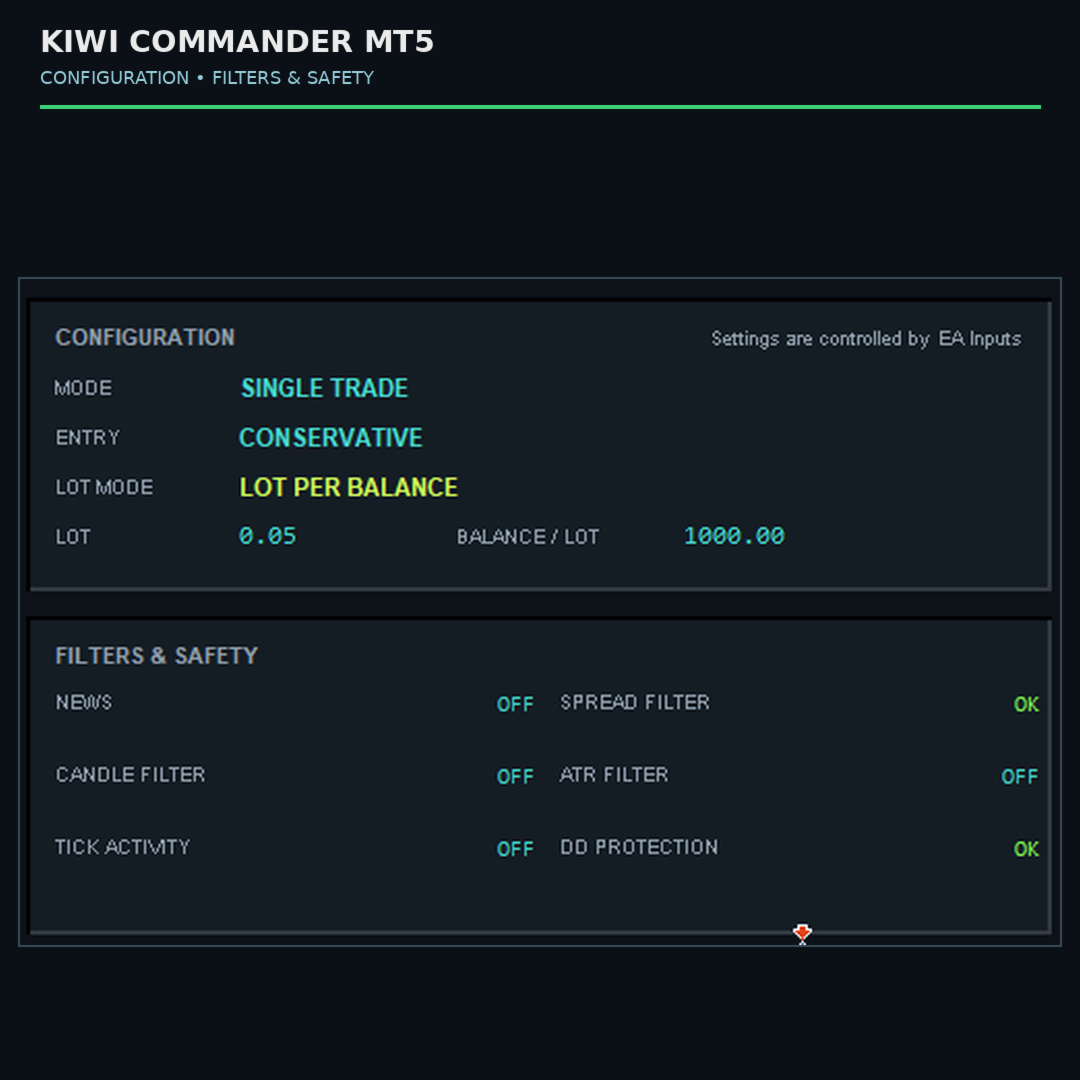
The Kiwi Commander dashboard displays important operating information directly on the chart.
The interface can show:
- Trading status
- Current signal status
- Equity
- Daily profit and loss
- Open positions
- Spread
- Trading mode
- Entry quality
- Lot mode
- Lot size
- Balance per lot
- Protection and filter status
- Account and session information
The dashboard is for monitoring. Trading configuration remains controlled through the EA Inputs.
Fast Tester
Fast Tester is an independent option designed to reduce unnecessary chart-interface processing during Strategy Tester operation.
The dashboard and Fast Tester settings are independent of each other.
Recommended Starting Configuration
The default settings are:
- Trade Direction: Both
- Lot Mode: Fixed
- Lots: 0.01
- Balance Per Base Lot: 1000
- Entry Quality: Conservative
- Signal Timeframe: M15
- Drawdown Protection: Enabled
- Maximum Balance Drawdown: 1.5%
- Drawdown Cooldown: 60 minutes
- Trailing Activation: 0 points
- Trailing Distance: 30 points
- Trailing Step: 10 points
- Fast Tester: Enabled
- Spread Protection: Enabled
- Trading Sessions: All Sessions
- Trading Days: Monday to Friday
- News Filter: Disabled
- Chart Interface: Enabled
These are starting parameters, not performance guarantees. Users should test and adjust settings according to their broker, account size, symbol specifications and trading conditions.
Input Parameters
Kiwi Commander Trading
Strategy1_Enable
Enables or disables Kiwi Commander trading.
Strategy1_Magic
Unique magic number used to identify trades managed by the EA.
Drawdown Protection
g_strategy1_enabledBalanceDDProtection
Enables balance drawdown protection.
Strategy1_MaximumBalanceDDPercent
Maximum allowed balance drawdown percentage before protection is activated.
Strategy1_BalanceDDCooldownMinutes
Number of minutes trading remains paused after a drawdown protection event.
Trailing Exit
TrailingStopActivation
Number of profit points required before trailing begins. A value of 0 starts trailing immediately.
TrailingStopDistance
Distance of the trailing stop in points.
TrailingStopStep
Minimum price movement in points required before the trailing stop is updated.
General Settings
tcomment
Comment assigned to trades opened by the EA.
TradeDirection
Selects the permitted trading direction:
- TRADE_BOTH
- TRADE_BUY_ONLY
- TRADE_SELL_ONLY
LotMode
Selects the position-sizing method:
- Fixed
- LotPerBalance
Lots
Fixed lot size, or base lot size when LotPerBalance is selected.
BalancePerBaseLot
Account balance represented by one base lot calculation.
For example, 1000 means that each 1000 units of account balance corresponds to the selected base lot size.
Entry Quality
EntryQualityMode
Controls entry selectivity:
- ENTRY_CONSERVATIVE
- ENTRY_BALANCED
- ENTRY_FREQUENT
Trading Timeframe
SignalTimeframe
Timeframe used by the EA for its primary trading signals.
The default setting is M15.
Fast Tester
FastTesterMode
Enables or disables Fast Tester mode.
Spread Protection
EnableSpreadProtection
Enables or disables spread protection.
MaxSpreadForTrading
Maximum permitted spread in points for opening new trades.
Time Settings
AllSessions
Allows trading across all configured sessions.
SydneySession
Enables the Sydney trading session.
TokyoSession
Enables the Tokyo trading session.
LondonSession
Enables the London trading session.
NewYorkSession
Enables the New York trading session.
Trading24h
Enables 24-hour trading when supported by the schedule configuration.
Monday
Enables trading on Monday.
MondayStartTime / MondayEndTime
Defines the Monday trading period.
Tuesday
Enables trading on Tuesday.
TuesdayStartTime / TuesdayEndTime
Defines the Tuesday trading period.
Wednesday
Enables trading on Wednesday.
WednesdayStartTime / WednesdayEndTime
Defines the Wednesday trading period.
Thursday
Enables trading on Thursday.
ThursdayStartTime / ThursdayEndTime
Defines the Thursday trading period.
Friday
Enables trading on Friday.
FridayStartTime / FridayEndTime
Defines the Friday trading period.
News and Dashboard
EnableNewsFilter
Enables or disables the economic-calendar news filter.
ShowChartInterface
Displays or hides the Kiwi Commander on-chart dashboard.
How to Use
- Install Kiwi Commander MT5 in MetaTrader 5.
- Open an XAUUSD chart.
- Select the preferred trading timeframe, with M15 as the default configuration.
- Attach Kiwi Commander MT5 to the chart.
- Review the EA Inputs.
- Select Fixed or LotPerBalance position sizing.
- Configure drawdown, trailing, spread and trading-session settings.
- Test the EA in the MetaTrader 5 Strategy Tester.
- Run the EA on a demo account before considering live trading.
Risk Notice
Automated trading involves financial risk.
Kiwi Commander MT5 does not guarantee profits or a specific trading result. Trading results can vary depending on market conditions, broker execution, spreads, liquidity, leverage, symbol specifications, account settings and other factors.
Strategy Tester results are simulations based on historical data and should not be interpreted as guarantees of future results.
Always understand the EA settings before using it and consider testing on a demo account first.
Support
For questions, bug reports and product-related assistance, please use the MQL5 Market product comments or MQL5 messaging system.
Important for your MQL5 editor
I recommend not adding emojis, sales claims such as “best,” “guaranteed profit,” “high win rate,” or phrases such as “make money automatically.” MQL5 specifically prohibits profit guarantees/hints and discourages excessive styling, flashy headings and special characters.
Also, don’t put your external website or Telegram/WhatsApp/Discord support link in this description. MQL5’s current rules require product support through MQL5 and restrict third-party links.
Your source confirms the actual public inputs, including Fixed / LotPerBalance, M15, drawdown protection, trailing exit, Fast Tester, spread protection, sessions, news filter and dashboard, so the description above is aligned with the current v1.000 build.








Reviews
There are no reviews yet.